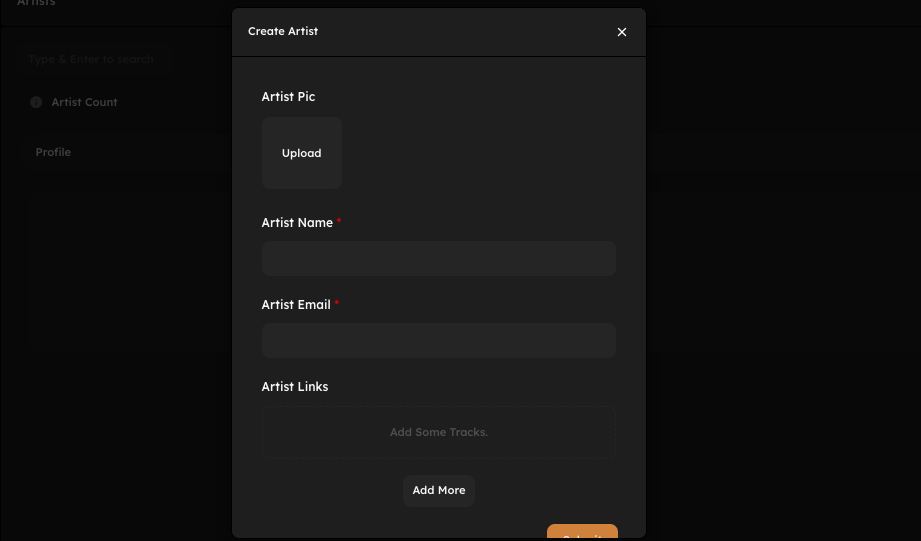
How to Complete Artist Profile on SunoDistro
Completing your artist profile correctly is an important step before releasing music on SunoDistro. A complete and accurate artist profile ensures your music is delivered to the correct artist pages on streaming platforms like Spotify, Apple Music, Instagram, and Facebook. It also helps listeners recognize your brand and improves long-term discoverability.
This guide explains how to complete your artist profile on SunoDistro step by step and what details matter most.
Why Completing Your Artist Profile Is Important
Your artist profile is your identity across all platforms. An incomplete or incorrect profile can cause:
Music appearing on the wrong artist page
Duplicate artist profiles
Delays in approval
Confusion for listeners
A properly completed profile ensures consistency, professionalism, and smooth distribution.
Step 1: Add Artist Name Correctly
Your artist name must be entered exactly as you want it to appear everywhere.
Important rules:
Use the same spelling on every release
Avoid unnecessary symbols or emojis
Do not add extra words like “Official” or “Music”
Maintain consistent capitalization
Changing artist names between releases can create multiple profiles on platforms.
Step 2: Select Artist Type
Choose the correct artist type based on your role:
Main Artist
Featuring Artist
Producer (if applicable)
Selecting the correct type helps platforms categorize your music accurately.
Step 3: Upload Artist Image (If Available)
An artist image improves credibility and recognition.
Best practices:
Use a clear, high-quality image
Square format preferred
Avoid logos or heavy text
Use the same image style across platforms
While optional, a professional artist image is strongly recommended.
Step 4: Complete Artist Metadata
Fill in all required artist information carefully:
Artist name
Role (Main / Featured)
Label association (if any)
This metadata links your releases correctly to your artist profile on streaming platforms.
Step 5: Keep Artist Information Consistent
Consistency is key. Always ensure:
Artist name matches previous releases
Metadata matches artwork text
No spelling variations are introduced
Even small differences can result in profile duplication.
Step 6: Verify Profiles on Streaming Platforms
Once your music is live:
Claim your profile on Spotify for Artists
Claim your profile on Apple Music for Artists
Verification gives you access to analytics, playlist pitching, and profile customization.
Common Artist Profile Mistakes to Avoid
Using different artist name spellings
Changing capitalization randomly
Uploading low-quality artist images
Mixing personal names and stage names
Creating multiple artist profiles unnecessarily
Avoiding these mistakes ensures long-term stability.
Best Practices for a Strong Artist Profile
Decide your artist name once and stick to it
Use professional visuals
Keep metadata clean and simple
Review details before every submission
A strong artist profile builds trust with both platforms and listeners.
Conclusion
Completing your artist profile correctly on SunoDistro is essential for smooth distribution and professional presentation. A consistent and well-maintained profile ensures your music appears in the right place, reaches the right audience, and supports your growth as an artist.
Take time to set up your artist profile properly before releasing music to avoid future issues.